
Cybersecurity researchers have identified a coordinated typosquatting campaign on the npm registry that delivered a multi-stage information stealer targeting Windows, Linux, and macOS systems. Ten malicious packages designed to impersonate popular libraries were uploaded on July 4, 2025 and together accumulated roughly 9,900 downloads before detection.
Attackers published 10 packages that mimic well-known npm projects. When a developer installs any of these packages, a malicious postinstall hook runs automatically and launches a chain of scripts that ultimately fetch and execute a 24 MB PyInstaller-packed information stealer. The operation is multi‑stage and heavily obfuscated to avoid analysis.
Packages observed
The malicious packages impersonated libraries such as discord.js, ethers, nodemon, react-router-dom, typescript, and zustand. The malicious package names were:
deezcord.jsdezcord.jsdizcordjsetherdjsethesjsethetsjsnodemonjsreact-router-dom.jstypescriptjszustand.js
How the attack works
Researchers at Socket (quoted researcher: Kush Pandya) described a consistent, automated infection flow inside each package:
- Installation triggers a
postinstallhook that runs aninstall.jsscript. install.jsdetects the victim’s operating system and spawns a new terminal window (Windows Command Prompt, GNOME Terminal /x-terminal-emulatoron Linux, or Terminal on macOS). Spawning a separate terminal helps the malware run independently of the npm process and briefly clears the new window to avoid drawing attention.- The script executes an obfuscated JavaScript payload named
app.js. That code is protected by four layers of obfuscation (including an XOR cipher with a dynamic key, URL‑encoding, and hexadecimal/octal arithmetic to hide program flow). - The
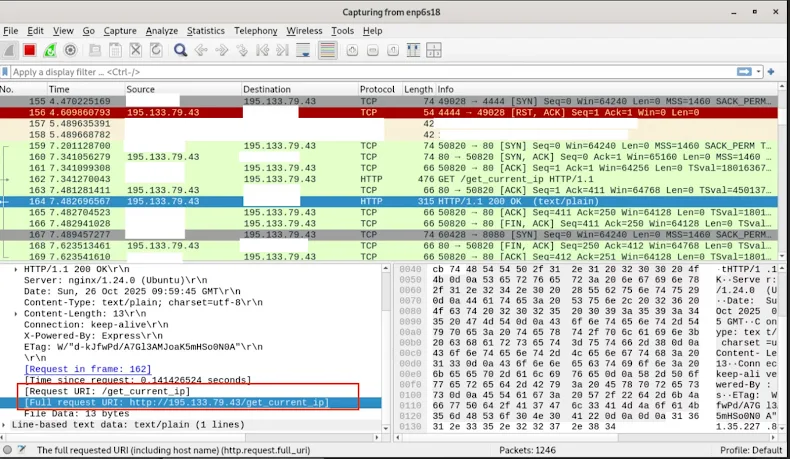
app.jspayload fingerprints the victim by IP address (the address is sent to an external server at195.133.79[.]43) and then downloads a 24 MB PyInstaller binary — the information stealer (data_extracter). - The stealer runs platform‑specific routines to harvest secrets: browser cookies and saved credentials, SSH keys and passphrases, configuration files, and entries stored in the OS keyring via the
keyringnpm library. - Harvested data is compressed into a ZIP archive and exfiltrated to the attacker’s server.
Why this is particularly dangerous
By targeting the system keyring and platform‑specific credential stores, the malware can extract decrypted credentials for services that integrate with the OS credential manager—examples cited by Socket include email clients (Outlook, Thunderbird), cloud sync tools (Dropbox, Google Drive, OneDrive), VPN clients (Cisco AnyConnect, OpenVPN), password managers (when integrated), database connection strings, and SSH passphrases. Access to these credentials can give attackers immediate access to corporate email, file storage, internal networks, and production databases.
The campaign’s combination of typosquatting, realistic installation output, fake CAPTCHA prompts, IP fingerprinting, and heavy obfuscation is designed to evade casual inspection and slow analysis by defenders.
Indicators of compromise from the report
- Presence of any of the listed npm packages in a
package.json/package-lock.jsonor innode_modulesafter an install. - Execution of a
postinstallscript that spawns a terminal window during npm installs. - Outbound network traffic to
195.133.79[.]43(or similarly suspicious hosts shortly after installing a package). - Download and execution of a large (~24 MB) PyInstaller binary from an npm package install.
Mitigation and recommended actions
If you use npm or manage developer environments, consider these immediate steps:
- Remove suspicious packages from projects and developer machines if present. Check
package.json,package-lock.json, andnode_modules. - Disable or audit npm lifecycle scripts in sensitive environments. Consider using
--ignore-scriptsfor installs in production or CI, or explicitly allow scripts only from trusted packages. - Lock dependencies use exact package names and lockfiles, and rely on vetted registries/mirrors for production builds.
- Restrict developer machine privileges where possible; limit ability to spawn background processes or run downloaded binaries without explicit approval.
- Monitor outbound connections for unusual traffic, particularly to the IP shown above and other unknown hosts. Investigate any unusual large binary downloads following npm installs.
- Scan systems with endpoint detection tools and validate keyring integrity; rotate credentials and secrets if compromise is suspected.
- Educate developers to watch for typosquatted package names and to verify package authors and download counts before installing unfamiliar packages.
Add a Comment