
66327647_605

X Platform to Discontinue Support for Twitter Domain 2FA

In a significant move as part of its rebranding and security overhaul, X formerly Twitter has announced it will stop supporting the old Twitter.com website for two-factor authentication by November 10, 2025. This decision underscores X’s ongoing transition away from its Twitter roots and towards a more secure, streamlined future.

Why This Matters

Two-factor authentication is a crucial security measure, providing an added layer of protection against phishing and unauthorized access. X’s decision to phase out the old Twitter domain for 2FA support primarily impacts users who rely on hardware security keys like YubiKeys for authentication. If you’re among those users, you’ll need to re-enroll your security key by the deadline to avoid any disruptions in accessing your account.

In a blog post, X explained, “By November 10, we’re asking all accounts that use a security key as their two-factor authentication method to re-enroll their key to continue accessing X.” The move aims to enhance security while also supporting the platform’s broader rebranding strategy under Elon Musk’s leadership.

What Does This Mean for Users

If you’re using a hardware security key for 2FA, here’s what you need to do:

  1. You’ll need to either update your existing key or register a new one. However, registering a new key will deactivate any prior keys, so make sure both are updated if you’re switching.
  2. If you don’t re-enroll by November 10, 2025, your account will be locked. To regain access, you’ll need to either update your security key, switch to an alternative 2FA method like authenticator apps or SMS codes, or, if you choose, disable 2FA altogether. X strongly discourages disabling 2FA, as this would leave your account more vulnerable.
  3. X recommends that users back up multiple hardware security keys, especially for high-profile accounts prone to targeted attacks. This ensures you have a fail-safe in case one key is lost or compromised.

The Reason Behind the Change

This change is a direct result of X’s shift to its x.com domain following its 2023 rebrand. The move is aimed at streamlining the platform’s authentication systems while eliminating potential vulnerabilities tied to the outdated Twitter.com infrastructure.

Experts in the field of cybersecurity have applauded this decision, noting that the old domain structure could expose users to domain-spoofing risks. As cybercriminals continue to exploit outdated branding and infrastructure flaws for social engineering attacks, this update will make it harder for bad actors to trick users into giving up their credentials.

What Security Experts Are Saying

The transition to a more modern authentication system aligns with industry trends towards domain-agnostic authentication. As the digital landscape becomes increasingly complex, platforms like X are recognizing the need to break free from legacy systems that could potentially expose users to greater security risks. By removing ties to the old Twitter branding, X is taking a proactive step in safeguarding its user base—an essential move, considering the platform boasts over 500 million active users worldwide.

Cybersecurity experts agree that the phase-out of the Twitter domain for 2FA support is a much-needed step, especially as cyber threats continue to evolve. Phishing attacks, domain spoofing, and social engineering tactics are on the rise, making this update not only timely but necessary to keep users safe.

The Big Picture

This update is part of a larger trend in the tech industry to move away from domain-specific authentication methods. As cybercriminals exploit outdated branding to manipulate users, it’s becoming more important than ever for platforms to modernize their security measures. X’s move to phase out the Twitter.com domain for 2FA reflects the ongoing evolution of digital security, and other platforms may soon follow suit in addressing legacy security concerns.

While there are clear benefits to the update, users must take action now to avoid potential disruptions. By re-enrolling your security keys before the November 10 deadline, you’ll ensure that your account remains secure and fully accessible as X continues to enhance its platform.

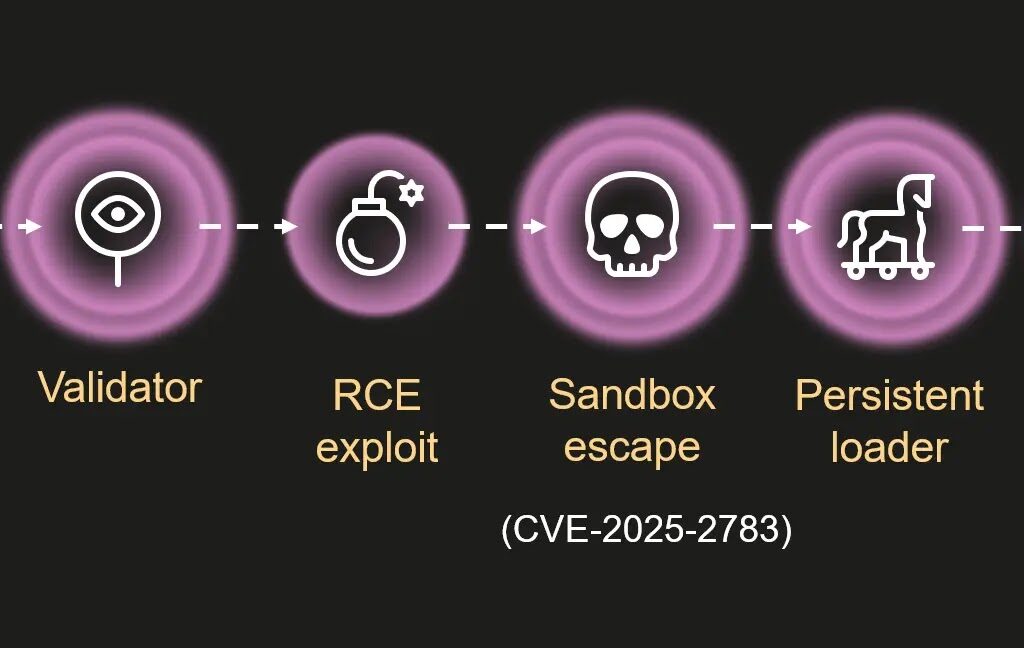
Chrome zero-day vulnerability-1

Mem3nt0 Mori’s Exploitation of Chrome’s Zero-Day Vulnerability

The notorious hacker group Mem3nt0 mori has once again made headlines, this time for actively exploiting a critical zero-day vulnerability in Google Chrome. This attack has caused a stir across Russia and Belarus, compromising high-profile targets with alarming precision. Known as CVE-2025-2783, the flaw in Chrome allowed these hackers to bypass the browser’s robust sandbox protections, leading to the deployment of sophisticated spyware on the victim’s machines.

Discovered by Kaspersky’s researchers in March 2025, the vulnerability was swiftly patched by Google. However, by then, the attackers had already used it in a series of well-coordinated cyberattacks. The attacks were part of a larger operation named ForumTroll, a campaign that targeted media outlets, universities, government agencies, and financial institutions. In this piece, we’ll take a closer look at how this attack unfolded and what it means for cybersecurity moving forward.

What is CVE-2025-2783?

CVE-2025-2783 is a flaw in Chrome’s sandboxing system that allowed attackers to escape its confines with minimal user interaction. Sandboxing is a security feature that isolates processes to prevent malicious code from affecting other parts of the system. However, this vulnerability circumvented Chrome’s sandbox defenses, enabling malware to run with elevated privileges and persist in the browser’s process.

The attackers exploited this flaw by crafting phishing emails that lured victims to malicious websites. When victims visited these sites, the exploit was triggered automatically — no downloads or clicks beyond the initial visit were required. This drive-by infection tactic is particularly insidious, as it leverages Chrome’s Mojo inter-process communication system, a key component responsible for managing data between browser processes on Windows.

The Technical Details Behind the Exploit

At the core of the exploit was a subtle logic flaw. Chrome’s code failed to properly validate certain pseudo-handles (e.g., -2, which refers to the current thread), allowing attackers to manipulate the system into duplicating handles across sandbox boundaries. This seemingly innocuous oversight was rooted in outdated Windows optimizations and proved to be a serious vulnerability.

By exploiting this flaw, attackers could execute shellcode within the privileged browser process. Once this access was gained, the attackers could deploy malware, ensuring persistence on the system by circumventing the browser’s sandboxing protections. In short, the attackers had found a way to inject malicious code into the browser’s core, enabling it to run with high-level privileges and evade detection.

The Attack Chain: How It Unfolded

Kaspersky’s Global Research and Analysis Team (GReAT) meticulously reconstructed the attack chain, which unfolded in several stages. Here’s how the attack worked:

  1. Phishing Email Validation: The initial stage involved the delivery of a phishing email, crafted to appear legitimate. The attackers used WebGPU, a web graphics API, to confirm that the email was being read by a genuine browser rather than an automated scanner. This made it difficult for security software to detect the attack.
  2. Key Exchange and Payload Decryption: If the email was opened in a real browser, the attacker would initiate an elliptic-curve Diffie-Hellman key exchange. This secure key exchange mechanism was used to decrypt the next stage of the attack, which was hidden in benign-looking files like JavaScript bundles and fonts.
  3. RCE Exploit: A remote code execution (RCE) exploit was used to inject malicious code into the victim’s system. However, the key element that made this attack particularly dangerous was the ability to bypass Chrome’s sandbox using CVE-2025-2783. Once inside the sandbox, the attacker could hijack browser processes and inject a persistent loader.
  4. Persistence via COM Hijacking: The persistent loader used COM hijacking to override Windows registry entries for legitimate system files like twinapi.dll. This ensured that the malware would continue running even after the browser was closed or the system was rebooted.
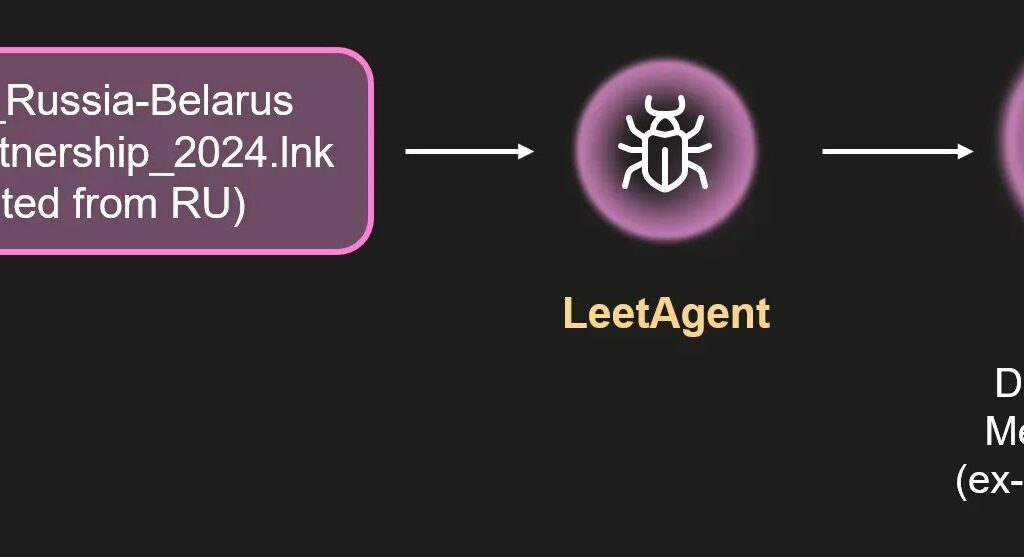
  5. LeetAgent: A Rare Spyware: The loader eventually decrypted and deployed LeetAgent, a highly sophisticated piece of spyware. LeetAgent operated using “leetspeak” commands, which allowed it to conduct keylogging, steal sensitive documents (including PDFs and spreadsheets), and inject itself into other processes. The malware communicated with command-and-control (C2) servers over HTTPS, with traffic obfuscation pointing to commercial origins.

Connections to Memento Labs and Dante Spyware

The technical sophistication of LeetAgent led Kaspersky to link it to Memento Labs, an infamous Italian firm that has been tied to spyware development in the past. LeetAgent’s design bore similarities to Dante, a spyware tool unveiled at the 2023 ISS World conference and attributed to Memento Labs. Dante itself was a rebranded version of software originally developed by the notorious hacking firm Hacking Team.

Dante was known for its advanced obfuscation techniques, including VMProtect encryption, anti-debugging features, and dynamic API resolution to evade detection. The fact that LeetAgent shares code with Dante suggests that Mem3nt0 mori’s operations are closely tied to this commercial spyware market, which has proven resilient despite efforts to shut it down.

The Fallout and Response

After Kaspersky’s discovery, Google quickly issued a patch to fix the CVE-2025-2783 vulnerability in Chrome. Users are urged to update their browsers to version 134.0.6998.177 or later to mitigate the risk. Additionally, experts recommend enabling Chrome’s enhanced safe browsing feature and staying vigilant against phishing attempts, which remain the primary vector for these types of attacks.

Interestingly, Firefox also patched a similar inter-process communication flaw (CVE-2025-2857), highlighting that other browsers may be vulnerable to similar exploits. Security professionals are warning that the risk of pseudo-handle vulnerabilities could extend to other software, so vigilance is critical across all platforms.

The Bigger Picture: The Shadowy Spyware Market

The attack by Mem3nt0 mori underscores a deeper issue within the world of cyber espionage: the persistence of commercial spyware. Despite the closure of notorious firms like Hacking Team, their legacy lives on in the tools developed by companies like Memento Labs. These tools are being used by APT (Advanced Persistent Threat) groups to infiltrate and extract valuable intelligence from high-profile targets.

While the technical details of CVE-2025-2783 and the resulting malware campaign are concerning, they are only one part of the larger picture. As the spyware market continues to evolve, so too does the sophistication of the attacks carried out by groups like Mem3nt0 mori.

Staying Ahead of the Game

The Mem3nt0 mori attack serves as a reminder of the evolving nature of cyber threats and the importance of staying one step ahead in the digital arms race. While patching vulnerabilities is essential, it’s equally important to remain vigilant against phishing attacks, ensure browsers and software are up to date, and be aware of the techniques used by cybercriminals.

As we continue to navigate the cat-and-mouse game of digital espionage, understanding the methods behind these attacks is key to developing better defenses. Whether it’s through zero-day vulnerabilities, social engineering, or sophisticated spyware, the stakes are higher than ever in the battle for digital security.

download-23-1024x512

The Root Cause Behind AWS Outage

A widespread outage at Amazon Web Services over the weekend caused massive disruptions across the internet, affecting e-commerce, streaming platforms, and critical enterprise systems that rely on Amazon’s cloud infrastructure.

The incident began late on October 19, 2025, and continued into the early hours of October 20, underscoring how deeply integrated AWS has become in the global digital ecosystem and how even short-lived technical failures can ripple across industries.

The Outage Unfolds

AWS first reported elevated error rates in its US-EAST-1 region at approximately 11:49 PM PDT on October 19. This region, based in Northern Virginia, serves as a major hub for internet traffic and cloud services worldwide.

As systems began to fail, the disruption quickly cascaded, affecting Amazon.com’s retail operations, multiple AWS services, and a wide range of third-party clients, from tech startups to major enterprises.

Users attempting to shop, stream media, or access cloud-hosted resources experienced widespread timeouts, failed logins, and service interruptions. Even AWS’s internal support tools were temporarily impacted.

Root Cause: DNS Resolution Failure

According to AWS’s incident report, engineers traced the root cause to a DNS resolution issue affecting the regional endpoints for DynamoDB, Amazon’s popular NoSQL database service.

The Domain Name System often referred to as the internet phone book failed to properly route traffic to the correct servers, leading to cascading failures across dependent systems.

By 12:26 AM PDT, engineers had implemented corrective measures, and DynamoDB functionality was restored by 2:24 AM PDT. However, secondary effects persisted for several hours.

To stabilize the environment, AWS temporarily restricted the launch of new EC2 virtual machines, a precautionary step designed to prevent further instability during the recovery process.

Gradual Recovery and Service Restoration

Progress toward full recovery continued through the morning of October 20. By 12:28 PM PDT, the majority of AWS services including those supporting high-traffic platforms such as Netflix and several government websites had regained normal functionality.

AWS engineers then began reducing the restrictions on EC2 instance launches while addressing lingering performance issues. Full operational stability was confirmed at 3:01 PM PDT.

Postmortem and Industry Response

In its post-incident analysis, AWS clarified that no evidence of a cyberattack was found, attributing the disruption solely to an internal DNS misconfiguration. The company emphasized its rapid response and the steps taken to prevent recurrence.

Despite the swift recovery, cybersecurity and cloud experts say the incident serves as a stark reminder of the centralized nature of the modern internet.

“Even a short-lived DNS failure can have a disproportionate impact,” said one independent cloud infrastructure analyst. “This outage shows how dependent global businesses are on a handful of core cloud providers — and how critical redundancy and failover planning have become.”

AWS has urged customers to monitor the AWS Health Dashboard for ongoing updates and published a detailed summary of the event on its official website.

Takeaways for the Cloud Industry

While the outage lasted less than a full day, its reach was significant — disrupting everything from online retail and streaming services to government systems and internal enterprise tools.

Experts say the incident highlights three key lessons for organizations operating in cloud environments:

  1. Diversify infrastructure to avoid single-region dependency.
  2. Implement robust DNS redundancy and real-time monitoring.
  3. Plan for fail over and recovery as part of standard business continuity strategies.

As cloud adoption continues to grow, the AWS outage of October 2025 stands as a critical case study in resilience and a reminder that even the most advanced infrastructures are not immune to failure.

10-tips-to-prevent-phishing

Phishing Attacks – Hackers Bypass Security Defense

October 24, 2025, Cybersecurity researchers warn that email phishing attacks have reached a critical inflection point this year, as threat actors deploy increasingly sophisticated evasion techniques designed to bypass traditional security tools and deceive even well-trained users.

According to new research from Secure list and other security firms, the phishing landscape in 2025 has evolved dramatically. Attackers are combining revived older methods with new delivery mechanisms that exploit weaknesses in automated scanning systems and human behavior

PDF Attachments Replace Links as Primary Attack Vector

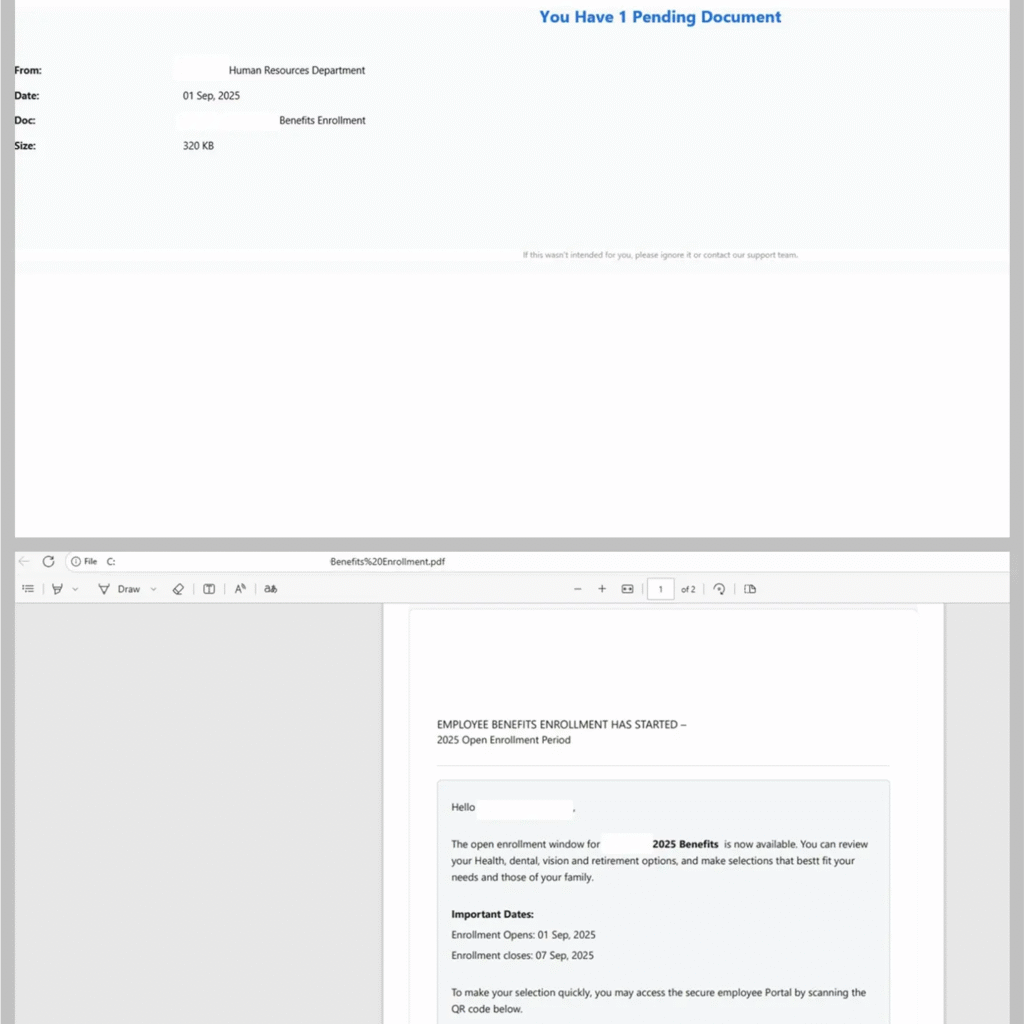
Researchers have documented a sharp rise in phishing campaigns that use PDF attachments instead of traditional hyperlink-based lures. These PDFs often contain QR codes that, when scanned, lead users to malicious websites designed to harvest login credentials.

This shift allows cyber criminals to bypass email filters that scan for malicious links while encouraging victims to use mobile devices, which typically lack enterprise-grade security protections.

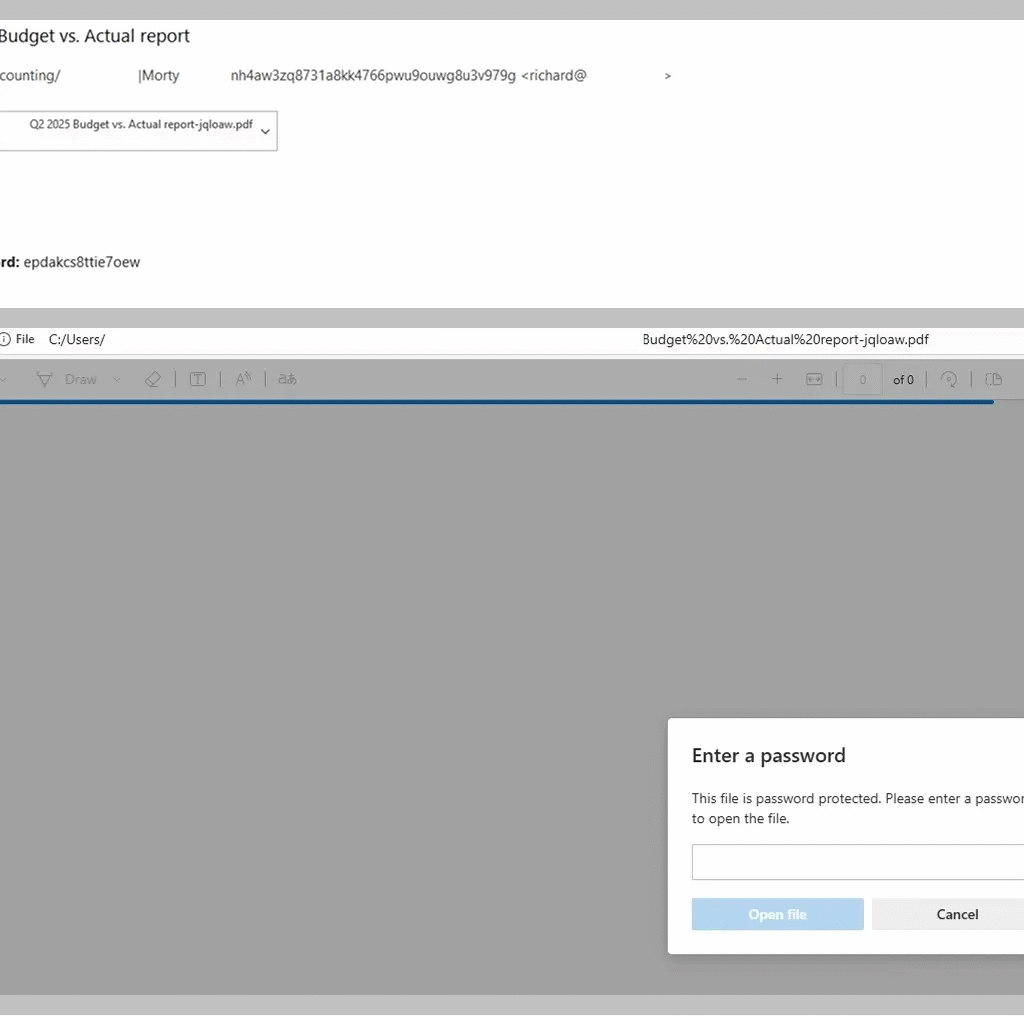
Secure list analysts report that these PDF-based phishing attacks have become more advanced, often using encryption and password protection to evade automated file scanning. In many cases, attackers send passwords in a follow-up message, a tactic that complicates detection and adds a false sense of legitimacy.

Security experts say this approach leverages psychological manipulation, mimicking corporate security protocols to increase user trust and compliance.

Calendar-Based Phishing Makes a Comeback

In a trend not seen since 2019, calendar-based phishing has re-emerged as a popular attack method. Instead of embedding phishing links in email bodies, cyber criminals insert them into calendar event descriptions.

Because calendar platforms automatically send reminders that often bypass email security checks, this strategy has proven especially effective in business-to-business (B2B) environments and corporate offices.

New Techniques Target MFA and Cloud Services

Phishing infrastructure in 2025 is more advanced than ever, with attackers implementing multi-layered evasion techniques that mimic legitimate authentication processes.

One increasingly common tactic involves CAPTCHA verification chains, requiring users to confirm they are human before proceeding to credential-harvesting pages. These CAPTCHAs frustrate automated scanners while preserving access for real users.

Researchers have also observed a surge in phishing campaigns targeting cloud storage and authentication services. In these cases, malicious websites interact directly with legitimate APIs in real time, mirroring the behavior of genuine login systems.

When victims enter their credentials, the phishing site communicates with the real platform, displaying authentic error messages and MFA prompts. This technique enables attackers to steal both passwords and one-time authentication codes, effectively bypassing multi-factor authentication (MFA).

Pixel-Perfect Phishing Pages Increase Realism

The visual fidelity of phishing pages has also improved. Attackers are now building pixel-perfect replicas of legitimate login portals, complete with corporate logos, folder structures, and interface details. These replicas make it nearly impossible for users to distinguish fake pages from real ones.

Once credentials are harvested, attackers can access accounts undetected, posing serious risks to businesses and individuals alike.

Experts Urge Layered Defense Strategies

Cybersecurity specialists warn that traditional email filters are no longer sufficient to counter these emerging threats. Experts recommend a multi-layered defense approach, including:

  • Continuous security awareness training for employees
  • Deployment of AI-driven email filtering tools capable of analyzing attachments and behavior patterns
  • Enhanced monitoring of authentication activity to detect suspicious access attempts

“The phishing attacks we’re seeing in 2025 are far more adaptive and convincing than anything we’ve encountered before,” said a Secure list analyst. “They blur the line between legitimate and malicious activity and that makes user education and detection technology more critical than ever.”

1_2sc9GIweA3DehmwnTnhEcw

Oracle VirtualBox Critical Bugs Enable Full System Takeover

Oracle has disclosed multiple critical vulnerabilities in its Oracle VM VirtualBox virtualization software, potentially allowing attackers to achieve complete control over the VirtualBox environment.

These flaws, detailed in the October 2025 Critical Patch Update (CPU), affect the Core component of VirtualBox versions 7.1.12 and 7.2.2, enabling high-privileged local attackers to compromise confidentiality, integrity, and availability with devastating consequences.

The disclosure highlights the ongoing risks in virtualization platforms, where even local access can lead to broader system impacts due to scope changes.

Experts warn that these vulnerabilities could facilitate full takeover scenarios, making immediate patching essential for users relying on VirtualBox for development, testing, and secure isolation.

No evidence of active exploitation has surfaced yet, but the high CVSS scores underscore the urgency.

Oracle’s advisory emphasizes that while exploitation requires high privileges and local access, the potential for unauthorized data access and denial-of-service attacks remains a severe threat.

Vulnerability Breakdown And Affected Versions

The October 2025 CPU addresses nine specific CVEs in VirtualBox’s Core, all classified as local exploits without remote authentication.

These issues stem from improper privilege handling and unsafe actions, allowing attackers with infrastructure logon to escalate control.

The most severe, including CVE-2025-62587 through CVE-2025-62590 and CVE-2025-62641, carry a CVSS 3.1 Base Score of 8.2, indicating high risk due to low attack complexity and changed scope.

For a comprehensive overview, the following table summarizes the CVEs, affected products, scores, and impacts based on Oracle’s risk matrix:

Lower-severity flaws like CVE-2025-61759 and CVE-2025-62591 to 62592 score 6.0 to 6.5, focusing on confidentiality breaches without integrity or availability disruption.

All vulnerabilities require local access but can propagate beyond VirtualBox due to scope changes. Successful exploitation could result in the complete takeover of the VirtualBox environment, exposing sensitive virtual machine data and enabling malware persistence across isolated systems.

For enterprises using VirtualBox in development pipelines or as a lightweight hypervisor, this poses risks of data leaks, ransomware deployment, or lateral movement in networks.

Individual developers might face personal data compromise if running untrusted guest OSes. The high integrity and availability impacts (scoring High) could cause crashes or unauthorized modifications, disrupting workflows.

While no public proofs-of-concept exist, the flaws’ similarity to past virtualization bugs raises concerns about targeted attacks.

Mitigations

Oracle urges users to apply the October 2025 CPU patches immediately, available via the official download portal.

Beyond patching, organizations should enforce least-privilege access, monitor high-privileged accounts, and audit VirtualBox configurations for unnecessary exposures.

Disabling unused features and isolating VirtualBox instances in segmented networks can mitigate risks. For those unable to patch promptly, temporary workarounds include restricting logon privileges and validating system integrity regularly.

2024-vivantio-integrations-cover-jira

Jira – Atlassian Patches High-Severity Path Traversal Flaw

Atlassian has issued an urgent security advisory for a high-severity path traversal vulnerability in Jira Software Data Center and Server, tracked as CVE-2025-22167. The flaw allows authenticated attackers to write arbitrary files anywhere accessible to the Java Virtual Machine process, a capability that could lead to data corruption, service disruption, or even code execution.

With a CVSS score of 8.7, this vulnerability affects Jira versions 9.12.0 through 11.0.1. Atlassian discovered the issue internally and has released patches addressing it in 9.12.28, 10.3.12, and 11.1.0.

What’s Behind the Vulnerability

The problem lies in insufficient input validation within Jira’s file handling mechanisms. Attackers with low-level authenticated access can exploit it by crafting malicious requests that include traversal sequences such as ../. This technique lets them bypass directory restrictions and write data to unintended locations on the server.

Because the attack is network-based, requires no user interaction, and involves low complexity, it can be exploited remotely by anyone with valid Jira credentials.

While the flaw primarily enables arbitrary file writes, Atlassian warns it could potentially be chained with other vulnerabilities to achieve data exfiltration or remote code execution.

Impact on Organizations

For teams relying on Jira for project management and DevOps, the risks are serious. Exploitation could lead to:

  • Corrupted configuration or project data
  • Malware deployment
  • Database tampering
  • Log deletion or alteration
  • Denial-of-service (DoS) scenarios

In regulated industries such as finance, healthcare, or government, even indirect exposure could result in compliance violations or intellectual property loss.

Although no public exploits have been reported, the low barrier to attack requiring only basic authentication that makes prompt patching essential, especially for internet-exposed instances.

How to Protect Your Jira Environment

Atlassian strongly advises all customers to upgrade immediately to one of the patched versions:

  • 9.x branch: 9.12.28 or later
  • 10.x branch: 10.3.12 or later
  • 11.x branch: 11.1.0 or later

If an immediate upgrade isn’t possible, Atlassian recommends the following interim mitigations:

  • Restrict filesystem write permissions for the JVM process
  • Limit network access to Jira instances
  • Deploy file integrity monitoring to detect suspicious changes
  • Maintain regular backups and security audits

Why This Matters

This incident highlights both the complexity of modern software supply chains and the importance of rapid patch management. Atlassian’s swift internal discovery and disclosure demonstrate proactive security practices — but delayed updates could still leave thousands of systems exposed.

With over 200,000 organizations worldwide depending on Jira for critical workflows, timely action is the best defense against potential exploitation.

AWS Outage

AWS Outage Cripples Major Services Worldwide

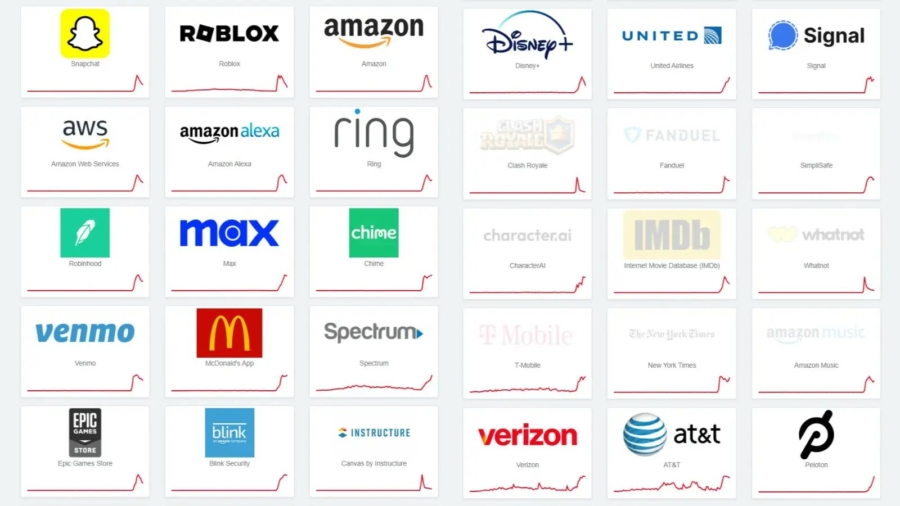
A widespread AWS outage on Monday caused major disruptions across the internet, affecting millions of users and temporarily disabling a long list of popular platforms and services — from e-commerce and social media to financial apps and design tools.

The outage began early Monday morning and quickly escalated, impacting several high-profile platforms including:

  • Amazon.com
  • Prime Video
  • Snapchat
  • Canva
  • Capital One
  • Delta Airlines
  • DoorDash

Media outlets, gaming platforms, and countless small business websites also reported slowdowns or complete inaccessibility.

A Flood of Frustration

Ironically, while many platforms went dark, users flocked to X one of the few unaffected to voice frustration, share error screenshots, and track the unfolding chaos.

The disruption affected everyday users and businesses alike:

  • Snapchat users couldn’t refresh feeds or send Snaps.
  • Prime Video subscribers were stuck in buffering limbo.
  • Canva users lost access to design tools mid-project.
  • Banks and airlines struggled with intermittent outages, affecting customer service and bookings.

The Root Cause – DNS & DynamoDB Failure

At the heart of the disruption was an internal failure within AWS’s ecosystem, specifically involving DynamoDB Amazon’s widely used NoSQL database service and a related DNS issue.

DNS acts as the internet’s address book, translating website names (like amazon.com) into machine-readable IP addresses. When this system failed within AWS, apps and services could no longer locate or retrieve the data they needed, causing a cascading breakdown across the internet.

The Cost of Downtime

By midday, early estimates suggested millions of dollars in lost productivity and revenue, especially for time-sensitive industries like media, marketing, and e-commerce.

This incident again highlights the risk of centralized cloud infrastructure and what happens when a single provider underpins a significant portion of the web.

AWS Response & Recovery

AWS engineers moved quickly to diagnose and isolate the issue, restoring partial service by early afternoon. A company spokesperson issued a brief statement:

“We’re investigating and will share more details soon.”

Amazon has not confirmed any signs of a cyberattack, instead pointing to an internal configuration error as the likely cause. A full root-cause analysis is expected in the coming days.

This marks yet another reminder of the fragility of hyper-connected systems. While cloud platforms like AWS offer scale and efficiency, they also pose a single point of failure for many global services.

Experts are now calling for greater redundancy, multi-cloud strategies, and contingency planning to avoid future internet-wide blackouts.

As of the latest update, most services are back online, though engineers are continuing to monitor performance and resolve residual issues. You can track real-time updates via the AWS status page

Canva Creators' Data Exposed

Canva Faces Major Global Outage Amid AWS Failure

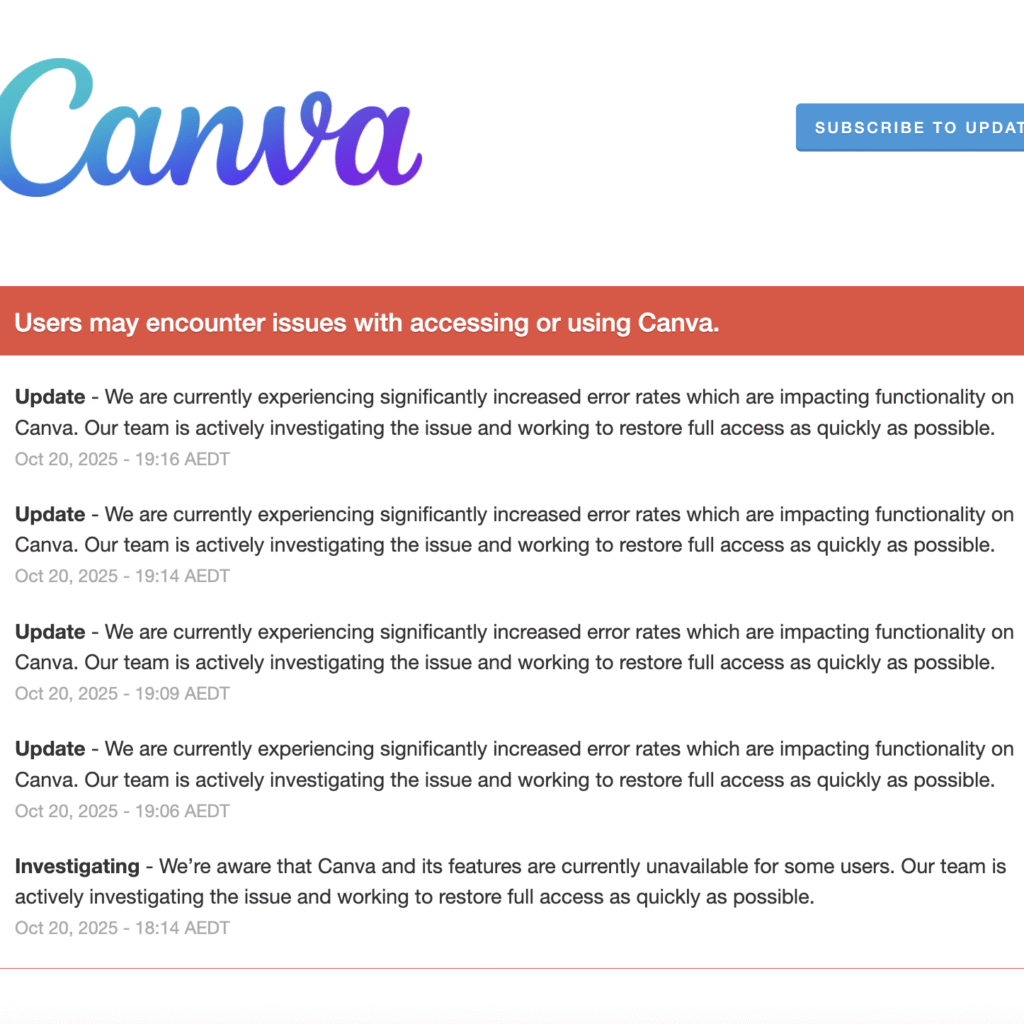
Canva, the beloved graphic design platform used by millions across the globe, is currently experiencing a major outage, leaving users unable to access critical features or even log in.

As of 19:16 AEDT (02:46 IST), Canva’s official status page reported “significantly increased error rates” affecting nearly all services, including login, design editing, saving, downloading, and sharing.

The disruption began escalating around 18:14 AEDT (03:44 IST), with Canva declaring a “Major Outage” across core functionalities.

“Our team is actively investigating and working to restore full access as quickly as possible,” the platform noted, a message that hasn’t changed since the initial alert.

A Global Impact

This outage isn’t isolated, it’s global. From India to the United States, users are reporting widespread issues across platforms:

  • Mobile apps (iOS & Android)
  • Desktop apps (macOS & Windows)
  • Third-party integrations like Google Classroom and Moodle
  • Even the Canva AI Connector, Apps SDK, and billing systems are offline

According to DownDetector, over 15,000 user reports have been logged in the past few hours, with:

  • 20% citing server connection issues
  • 17% reporting app failures

AWS Outage at the Core

The root cause appears to be linked to Amazon Web Services (AWS) — specifically, the US-EAST-1 region, which began experiencing elevated error rates and latency around 03:11 AM ET (12:41 IST).

Canva, like many tech platforms, relies heavily on AWS for its backend infrastructure. While multiple services are affected, Canva’s 220 million monthly active users are feeling the brunt of the disruption.

Users React – Frustration and Memes

On social media platform X (formerly Twitter), the hashtag #CanvaDown is trending as users share their frustrations and memes:

  • A U.S. marketer wrote: “Was supposed to launch promo campaigns… Canva down, chaos!”
  • An Indian agency head tweeted: “@canva what is happening? It is a critical day!”
  • From the Philippines, a user noted: “Ini-report ng netizens na hindi nila ma-access ang Canva ngayong Lunes.”

In India, where Canva is a go-to for Diwali graphics and festive promotions, the timing couldn’t be worse. Many freelancers and small businesses have shared that the outage is costing them hours of productivity and missed deadlines.

windows_11_1

Windows 11 October Update Breaks Localhost

Microsoft’s October 2025 cumulative update (KB5066835) for Windows 11 has introduced a disruptive issue that’s impacting developers and IT environments across the board. After installing the update—particularly on build 26100.6899—many users have reported that localhost functionality is broken, rendering local web services and applications unreachable via 127.0.0.1.

Developers began noticing issues immediately after the update was rolled out on October 14, 2025. Applications that rely on local web servers, such as those running via IIS Express or Kestrel, are now frequently throwing HTTP/2 protocol errors like:

  • ERR_HTTP2_PROTOCOL_ERROR
  • ERR_CONNECTION_RESET

This bug is more than an inconvenience. It’s disrupting core workflows like:

  • Debugging in Visual Studio
  • Testing ASP.NET applications
  • Running desktop software that communicates internally via loopback

Even Chromium-based browser previews are failing in local environments, causing widespread frustration among developers.

The issue isn’t limited to individual users or hobbyist developers. Large software vendors and enterprise customers are affected too.

For instance, Autodesk confirmed that its Vault software has been impacted, advising customers to roll back the update to restore functionality. Posts on Microsoft’s own support forums, Stack Overflow, and Server Fault further confirm this is a global issue affecting production environments, internal business tools, and development setups alike.

Root Cause: HTTP.sys Modifications

Preliminary investigations suggest that the problem originates from changes made to HTTP.sys—the Windows kernel-mode driver responsible for handling HTTP traffic.

Update KB5066835 included security-related updates to HTTP.sys, but these changes seem to have broken HTTP/2 loopback negotiation under certain configurations. Systems that had also installed the September preview update (KB5065789) appear especially vulnerable.

Workarounds and Fixes

Until Microsoft releases an official fix, affected users have reported several temporary workarounds:

Uninstall Recent Updates

Run the following commands in Command Prompt (admin) to remove the offending updates:

wusa /uninstall /kb:5066835
wusa /uninstall /kb:5065789

Then restart your system.

Disable HTTP/2 (Registry Edit)

Navigate to:

HKEY_LOCAL_MACHINE\SOFTWARE\Microsoft\IIS\Parameters

Create or modify the DWORD key:

EnableHttp2 = 0

Then reboot. (Proceed with caution and backup your registry first.)

Update Microsoft Defender

Some users report that updating Microsoft Defender Antivirus definitions via KB2267602 has resolved the problem without uninstalling the updates entirely.

Notable Observations

  • Fresh installs of Windows 11 are not affected, indicating that the bug arises due to conflicts with existing configurations, not a core OS flaw.
  • As of October 17, 2025, Microsoft has not officially acknowledged the issue on the KB5066835 update page, though internal responses on support forums hint that engineers are working on a fix.
  • A Defender intelligence update or minor patch may already be softening the impact for some users, but success appears to vary by system and setup.
18925617_605

Banking Trojan Spreading Through WhatsApp in Brazil

A new and highly advanced banking Trojan, dubbed Maverick, has surfaced in Brazil, exploiting WhatsApp as its main vector to compromise thousands of unsuspecting users. First detected in mid-October 2025, Maverick has already triggered over 62,000 blocked infection attempts within just the first ten days, signaling a significant threat to Brazilian internet users

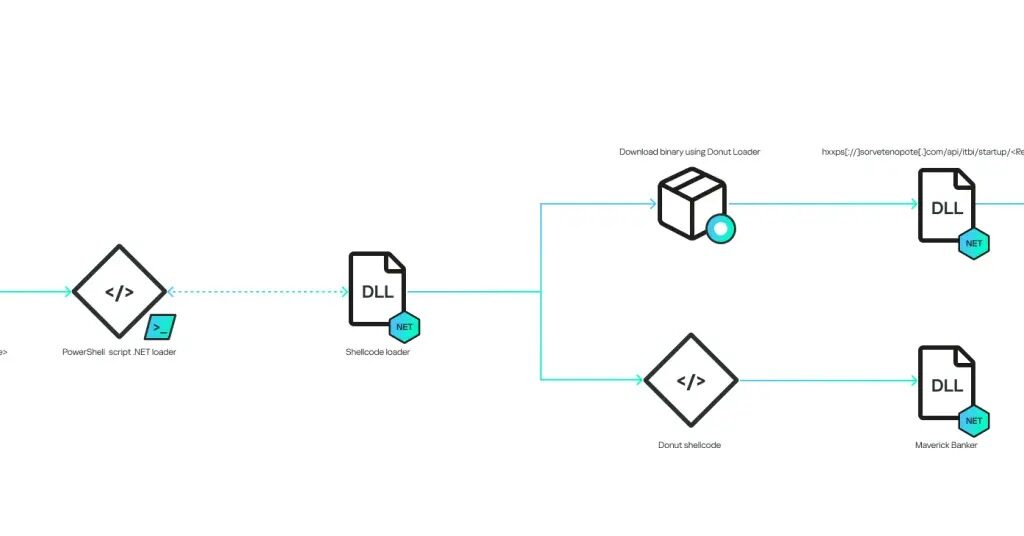
Maverick targets Brazilian users by sending Portuguese-language WhatsApp messages that include malicious ZIP archives. These archives cleverly bypass WhatsApp’s security filters and contain a weaponized .LNK file, a Windows shortcut file that acts as the Trojan’s entry point.

The infection process begins when victims open these ZIP files, often disguised as bank notifications or important documents. The .LNK file then launches a chain of commands through cmd.exe and PowerShell, connecting stealthily to command-and-control (C2) servers. These servers validate the malware with stringent authentication protocols before downloading additional payloads.

What makes Maverick especially dangerous is that it operates in a fully fileless manner, all malicious components run directly in the system’s memory without writing files to the disk. This approach makes detection by traditional antivirus tools extremely difficult.

An Evolution in Malware Development: AI-Assisted Coding

Researchers at Securelist have found that Maverick shares significant code overlap with Coyote, a Brazilian banking Trojan documented in 2024. However, Maverick is more sophisticated, notably due to its use of artificial intelligence during its development. AI techniques are leveraged particularly for decrypting security certificates and optimizing the malware’s code-writing process.

This marks a worrying trend where cybercriminals are integrating AI tools to create more potent and evasive malware, raising the stakes in the cybersecurity battle.

Confirming the Victim’s Location

Maverick includes stringent geographic targeting measures to avoid detection and ensure attacks focus solely on Brazilian users. The malware checks:

  • System timezone
  • System language
  • Region settings
  • Date format

If any of these indicators do not confirm a Brazilian environment, the malware immediately terminates, preventing analysis by security researchers outside Brazil.

Spyware Capabilities and Data Theft

Once activated, Maverick unleashes an arsenal of surveillance tools:

  • Capturing screenshots
  • Monitoring browsers
  • Logging keystrokes
  • Controlling the mouse
  • Displaying overlay phishing pages

These tactics target credentials from 26 Brazilian banks, six cryptocurrency exchanges, and one payment platform, aiming to steal sensitive financial information and take over accounts.

Self-Propagation Through WhatsApp Account Hijacking

Perhaps the most alarming feature of Maverick is its ability to self-propagate by hijacking infected users’ WhatsApp accounts. Using WPPConnect, an open-source WhatsApp Web automation framework, the malware automatically sends malicious messages to all contacts in the victim’s list.

This worm-like behavior allows the Trojan to spread rapidly and exponentially, leveraging WhatsApp’s massive user base as a distribution network.

Advanced Command-and-Control Security

Maverick’s C2 infrastructure employs sophisticated security measures to avoid detection and tampering:

  • HMAC-256 signatures authenticate each request with a hardcoded secret key: "MaverickZapBot2025SecretKey12345".
  • Validation of User-Agent headers ensures that only genuine malware clients connect.
  • API endpoints deliver payloads encrypted as shellcodes using Donut loaders, with XOR encryption keys cleverly hidden within the payload’s final bytes.

The malware’s decryption method extracts the encryption key from the payload itself by reading the last four bytes to determine key size and then applying XOR operations to decrypt the entire code. Additionally, heavy code obfuscation techniques, such as Control Flow Flattening, make reverse engineering and analysis extremely challenging.